
Every decision links to the moment it was said
Tap a decision or action item and the recording jumps to it, so you hear who said it and how.
Now on WindowsMac
The AI meeting notetaker that records your calls and in-person meetings, then writes the minutes: decisions and action items, each linked to the moment it was said.

WORKS WITH THE WAY YOU ALREADY MEET
The recorder sits in your menu bar or tray and asks when a meeting app starts using your microphone. It records both sides of the call without a bot joining, and offers a recording notice to share with everyone.
Speech becomes text with each speaker named. Tell Zrec who someone is once, and it can recognise their voice next time.
Decisions and action items with owners and due dates. Tap any of them to hear exactly who said it. Not quite right? Write them again anytime.
Open Zrec and see what needs your review, the action items that are yours, and what’s still processing. No hunting through recordings.
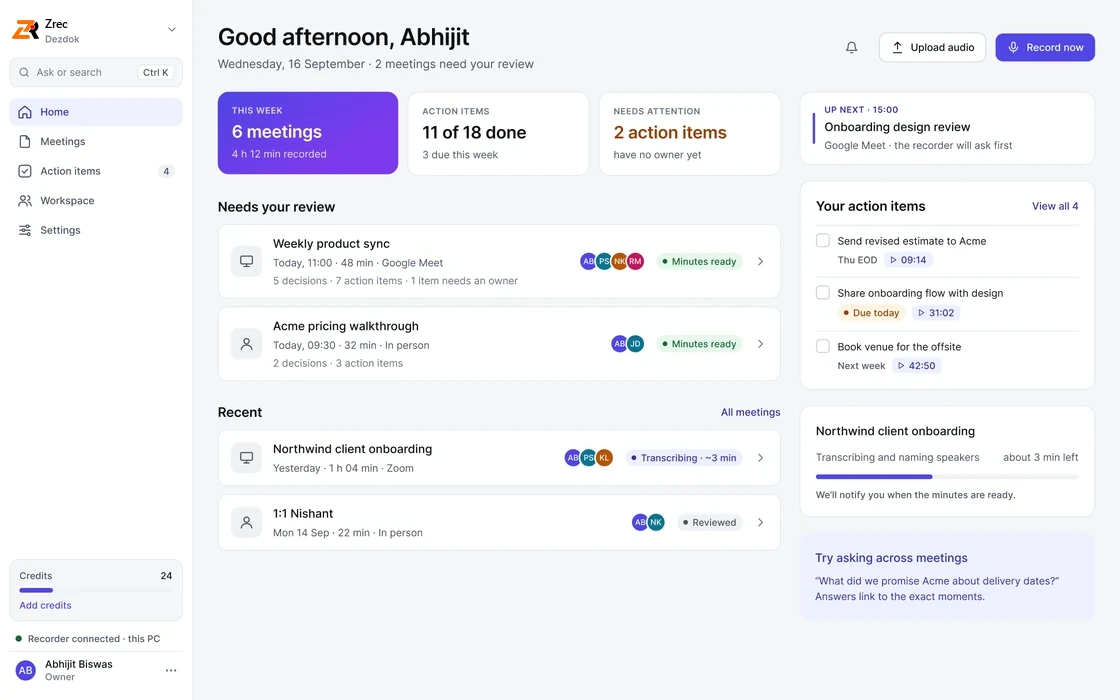
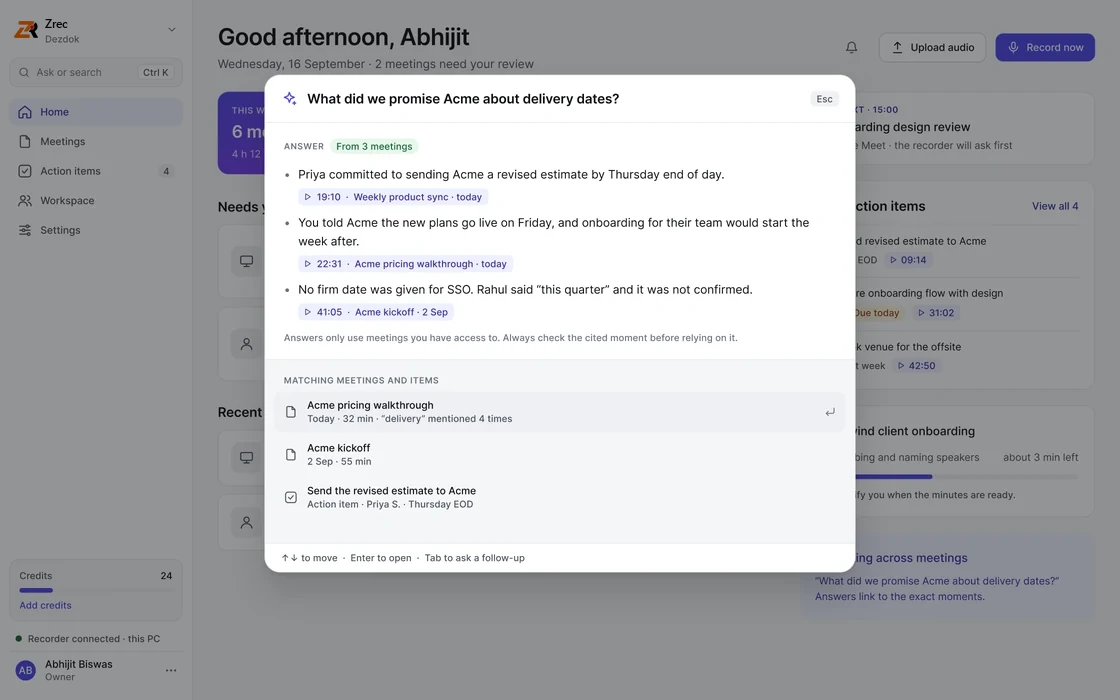
Press Ctrl K and ask in plain words. Zrec answers from your meetings and shows the exact moments, so you can listen before you quote it.
Nobody has to argue about what was agreed. Every line points back to the recording.
Tap a decision or action item and the recording jumps to it, so you hear who said it and how.
Get answers with the meetings and moments they came from.
See what’s yours and what’s due, and give unowned items an owner right from the minutes.
Pick a short summary, decisions with owners, or the full detail. Not quite right? Write them again, or transcribe the meeting again, whenever you like.
Name a voice once and Zrec can recognise it in later meetings. Forget any voice at any time.
No bot joins your call and nothing records in the background. Everyone in the meeting can know, and anyone can ask for their recording to be deleted.
I’m recording this meeting with Zrec so I can share accurate notes. It stays inside our workspace and isn’t used to train AI. Prefer not to be recorded? Say so, or ask for deletion here:
zrec.dezdok.com/d/58EA9WThe recorder offers the notice above the moment recording starts.
The link in the notice lets anyone in the meeting request it. No account needed.
Remove recordings after 7 to 365 days and keep only the minutes.
Speaker memory can be switched off, or kept to your own team.
Start free and pay only for the minutes you use. Pick a plan when meetings become a daily habit.
Business plans for 10 or more seats. Minute bundles from $4. No tax added at checkout.
Practical guides to minutes of meeting, AI notetakers and recording meetings in India.
A copy-ready MOM template, a filled-in example and the eight parts every set of minutes needs.
Read the guide →How to capture Zoom, Meet and Teams calls from your own computer, with nothing in the participant list.
Read the guide →Why Hindi and English mixed together trips up transcription, and how to get clean minutes anyway.
Read the guide →A five-point checklist and an honest comparison of the popular tools.
Read the guide →What the law says, a consent notice you can copy, and how long to keep recordings.
Read the guide →Fill in the details, decisions and action items and copy clean minutes of meeting in seconds.
Try the generator →Two notetakers built for Indian teams, compared on recording, Hinglish, devices and pricing.
Read the comparison →A fair look at where Otter works well and where Hindi, Hinglish and in-person meetings need more.
Read the guide →Where Fireflies fits, where Hinglish and in-person meetings need more, and a checklist for any switch.
Read the guide →
Create a free account, install the Windows app, and your next call ends with decisions and action items ready to share.
By signing up you agree to the Terms and Privacy Policy. Your workspace is ready as soon as you confirm your email.
Zrec is an AI meeting notetaker and minutes of meeting (MOM) generator. It records meetings from your computer, transcribes them with each speaker named, and writes the minutes: a summary, the decisions, and action items with owners and due dates. Every decision and action links to the moment in the recording where it was said.
Yes. After a meeting is transcribed, Zrec writes the minutes of meeting for you: summary, decisions, action items, owners and open questions. You choose how detailed they should be, and you can write them again or transcribe the meeting again at any time.
Yes. Choose Hindi / Hinglish in Settings and meetings where people mix Hindi and English are transcribed in Roman script, the way people type Hinglish. The minutes are always written in English.
Many AI notetakers join your call as a bot. Zrec records from your own computer instead, so nothing extra appears in the meeting, and it works for in-person meetings too. It understands Hindi and Hinglish, links every decision to the moment it was said, and you pay only for what you use.
Yes. Zrec records the sound on your computer, so it works with Zoom, Google Meet, Microsoft Teams, Slack huddles, phone calls on your laptop and any other meeting app, without installing anything in them.
Right away. Sign up, confirm your email and your workspace is ready, with the recorder to download and set up in a couple of minutes.
No. The Zrec app on your computer records your microphone and your computer’s sound, so nothing extra appears in the meeting.
Rules differ by country and state, and many require everyone’s consent. Zrec gives you a recording notice to share at the start of each meeting; telling participants is your responsibility.
Windows 10 and 11, and Mac (macOS 13 Ventura or newer). Your minutes open in any browser, including on a Mac.
Yes. Start a recording on a laptop in the room and Zrec handles it like any call.
Pay As You Go has no monthly fee: your first month includes 120 minutes of transcription with minutes of meeting, then 60 minutes every month, and minute bundles start at ₹349 whenever you need more. For regular use, Pro is ₹1,199 a month with 1,200 minutes, or ₹11,999 a year. Team plans start at ₹1,099 per seat a month, with minutes shared across the team and free seats for people who only read. Pay As You Go includes unlimited recordings (up to 3 hours each, for service safety), kept for 3 months; Pro and Team have no limit on recording length and keep recordings while you subscribe. Prices exclude 18% GST and come with a GST invoice. Your account is ready as soon as you confirm your email. See all plans and prices.
Yes. Deleted meetings are erased permanently after 30 days, and admins can have audio removed automatically after a set number of days.